Lazy Loading Campaign Data: Cut Bootstrap Size by 25x
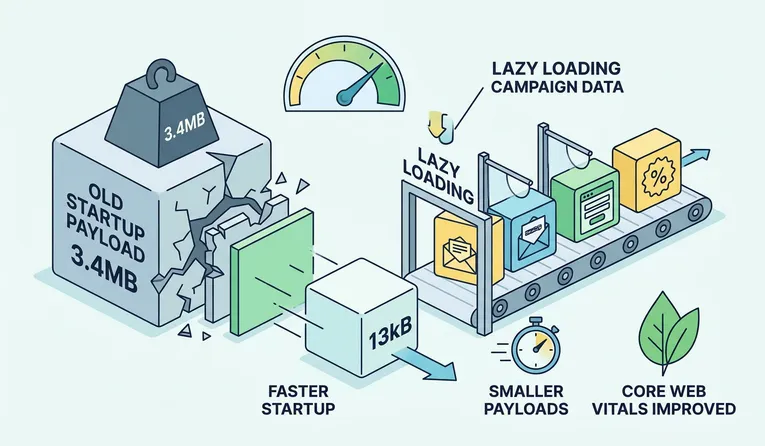
If your app feels slow or clunky on startup, the problem is often how campaign data is loaded. Lazy loading campaign data reduces the initial payload, speeds up rendering, and improves performance metrics like Core Web Vitals.
This approach helps apps load faster, use less bandwidth, and deliver a smoother experience for every user.
In this article, we’ll show you why shipping all your campaign data upfront can slow things down and how lazy loading campaign data fixes that. You’ll see real numbers that prove just how much faster and lighter the app can become, and learn what it means for your users, their devices, and Core Web Vitals. We’ll also walk you through how we implemented it in a sustainable, privacy-first way. By the end, you’ll understand why this approach matters and how you can use it to make your own apps faster and more efficient.
When Does Startup Data Slowly Get Out of Hand?
Most performance issues do not appear overnight. They creep in quietly.
As the products grow, campaign configurations grow with it. New markets bring new campaigns. New campaigns add more rules, conditions, and metadata.
Over time, all of that campaign data ended up bundled into the startup configuration.
That decision worked early on. Everything was available immediately. There were no extra requests.
Eventually, though, the tradeoffs became obvious.
- Startup payloads kept growing
- Cold starts felt slower on weaker networks
- Devices spent more time parsing JSON before anything useful happened
This is how startup bloat sneaks in.
Why Loading Everything Upfront Is a UX Tax
Loading too much data at startup creates friction that users feel, even if they cannot explain it.
When large payloads ship immediately:
- The browser waits longer before rendering
- The main thread blocks on parsing and memory allocation
- Garbage collection starts earlier
- The interface feels sluggish on first interaction
These issues are amplified on slower cellular networks and lower-powered devices.
Compression helps, but it does not change when the work happens.
Reducing this kind of work is not just about speed. It is about efficiency, predictability, and respect for user devices.
The Question That Changed Everything
Instead of asking how to shrink the startup file further, we asked a simpler question.
What does the application truly need to start?
Most campaigns are only relevant after a user interacts with the product. Loading them upfront was unnecessary work.
That realization led us to lazy loading campaign data.
How Lazy Loading Campaign Data Actually Works?
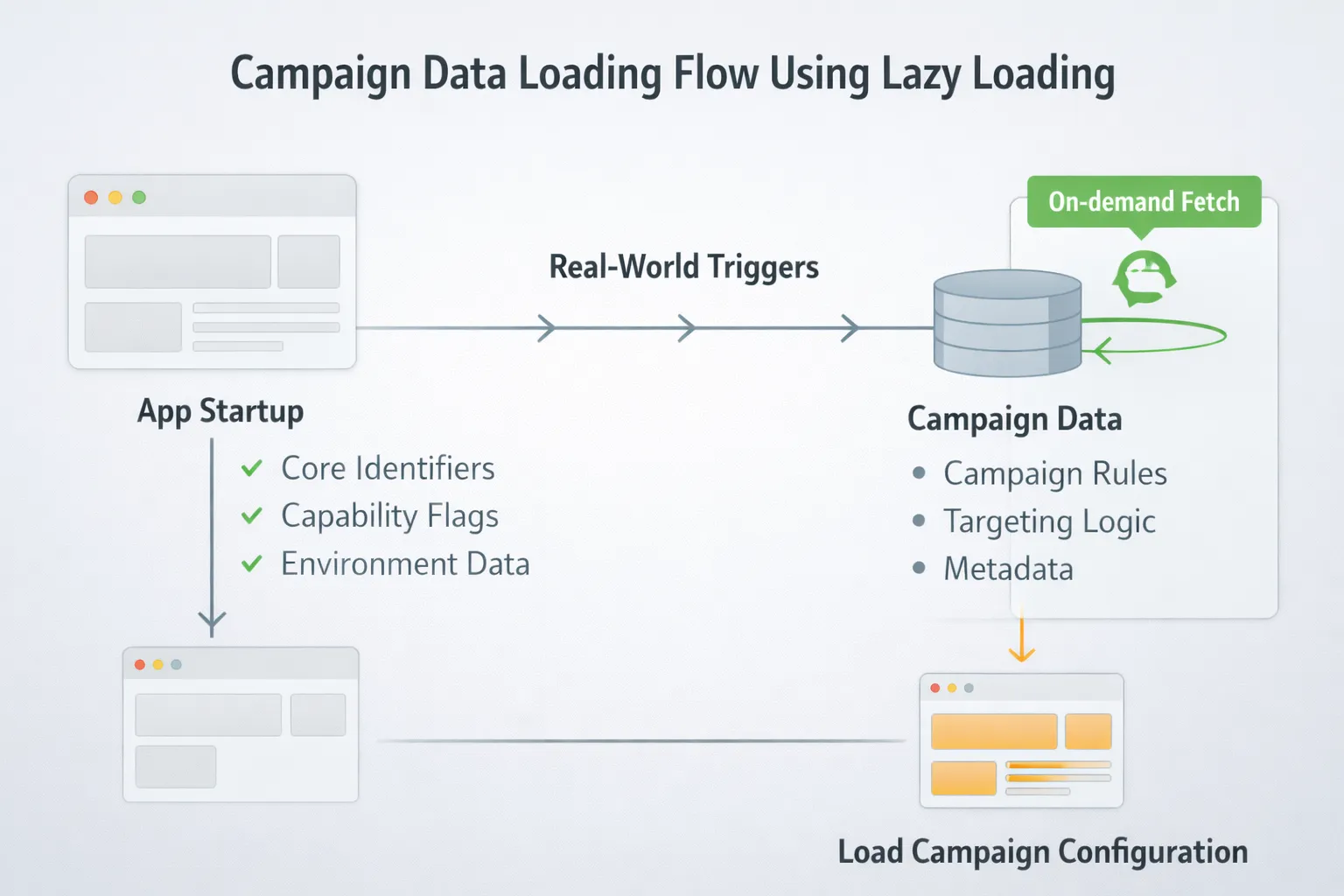
The idea is straightforward.
Only ship what the application needs to initialize and load campaign data later, when it is actually required.
At startup, we now include:
- Core identifiers
- Capability flags
- Environment-level configuration
Campaign payloads are fetched later, based on real triggers. This single change removed the largest source of startup bloat and aligns with our broader philosophy of writing sustainable code, building systems that are efficient, maintainable, and scalable while reducing unnecessary resource usage.
A Quick Detour: Why Compression Was Only Step One
Before restructuring anything, we enabled modern compression using zstd.
That cut the payload size by about 50 percent, which was helpful.
However, compressed data still needs to be inflated and parsed. The browser still pays that cost during startup.
Lazy loading campaign data fixed the real issue by moving that work out of the critical path.
The Numbers That Made Us Stop and Double-Check
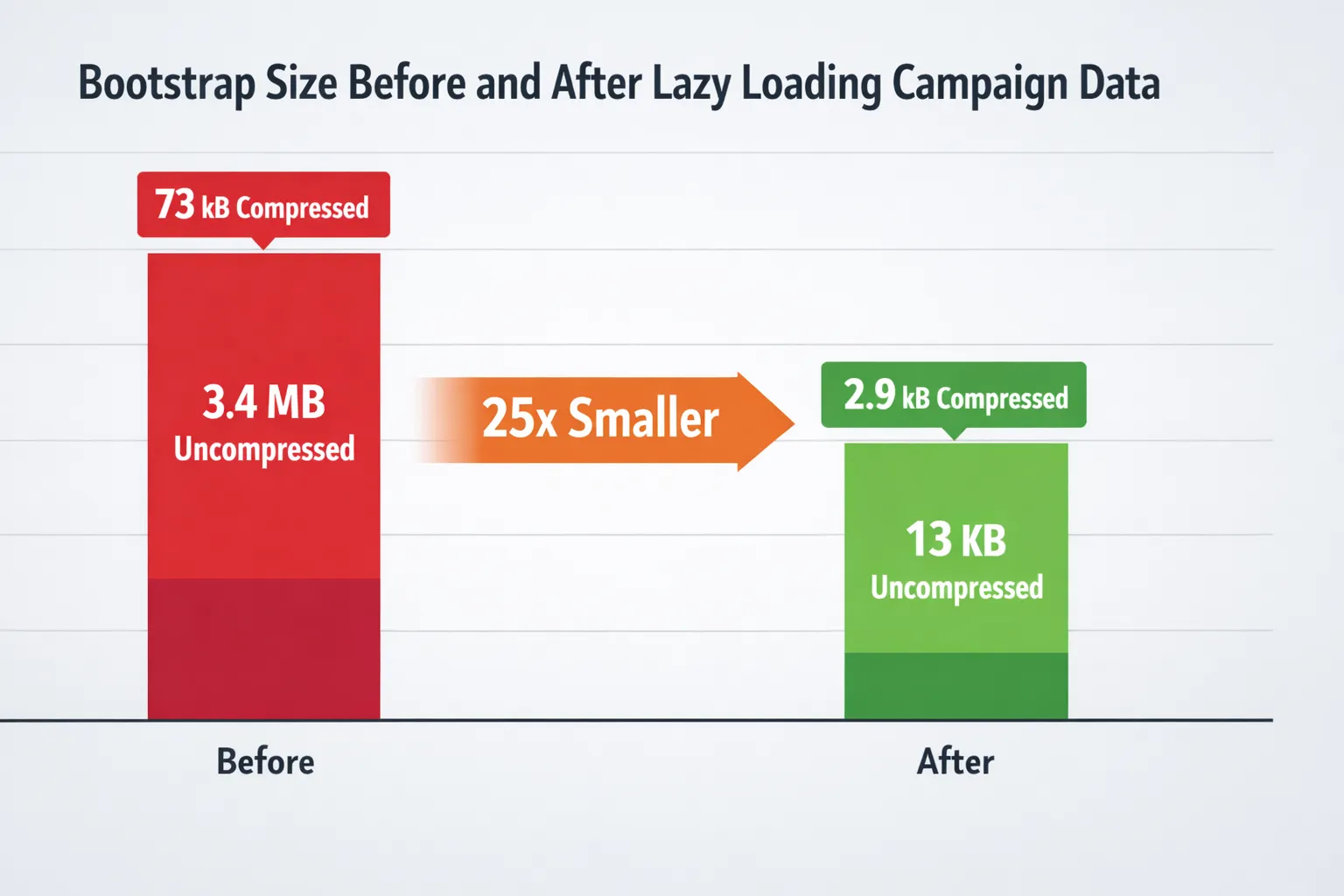
Here is a real before-and-after comparison from one customer.
What the Bootstrap Looked Like Before
- 73kB compressed
- 3.4MB uncompressed
What It Looks Like Now
- 2.9kB compressed
- 13kB uncompressed
That works out to:
- 96 percent smaller compressed payloads
- 99.6 percent smaller uncompressed payloads
- 25x reduction in compressed bootstrap size
Each request now avoids sending roughly 70.1kB of compressed data.
What Do Those Numbers Mean On Real Networks?
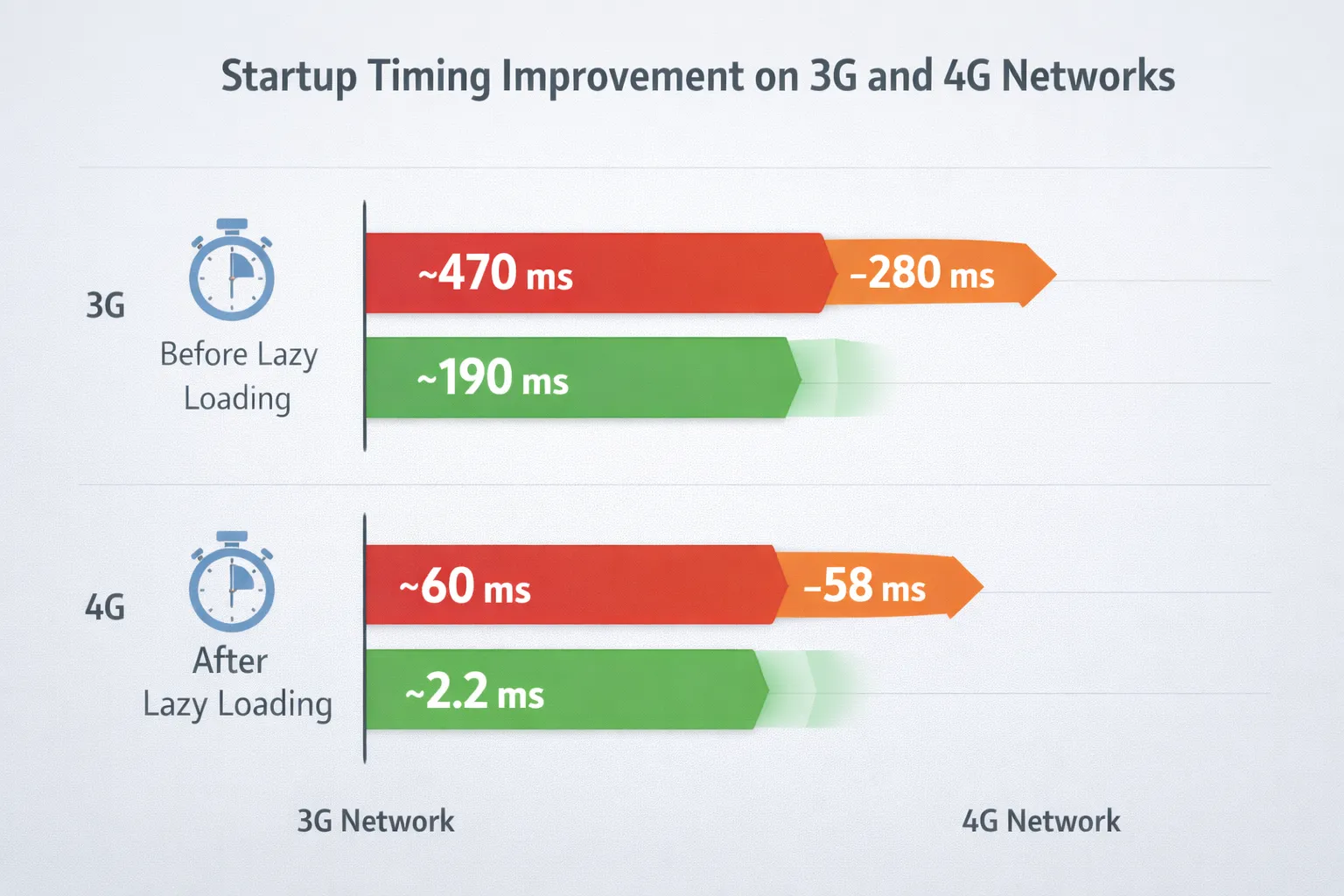
Performance improvements matter most when networks are not perfect.
On a 4G connection, the initial bootstrap dropped from around 58 ms to just over 2 ms.
On a 3G connection, startup time dropped by close to 280 ms.
Those savings happen before rendering even begins, which makes the interface feel faster immediately.
Parsing Costs: The Hidden Startup Bottleneck
Network speed is only half of the performance story.
Parsing 3.4MB of JSON can take 70 to 170 ms on mid-range or lower-end devices. That work blocks the main thread.
Parsing 13kB is essentially free.
By lazy loading campaign data, we dramatically reduced:
- Main-thread blocking
- Early garbage collection
- Cold-start UI stalls
This improvement shows up as smoother first interactions.
What End Users Actually Notice?
From the end user’s perspective, the experience simply feels better.
- The app opens faster
- Buttons respond sooner
- Scrolling feels smoother on first load
- Battery drain during startup is lower
- Less data is used on cellular connections
These improvements line up closely with how Core Web Vitals measure real user experience.
How We Implemented Lazy Loading Campaign Data
Here is how the system is structured today.
Keeping the Bootstrap Lean on Purpose
The startup configuration now includes only what is required to initialize the application. Campaign definitions are intentionally excluded.
Making Sure Payloads Stay Small
All payloads use modern compression and strict JSON minification to avoid unnecessary bytes.
Letting the Cache Do the Heavy Lifting
Campaign data is served using hashed URLs.
This allows:
- Long-lived caching
- Efficient CDN delivery
- Minimal re-downloads for repeat visitors
Fetching Campaigns Only When They Matter
Campaigns load based on real triggers, not during initial response time. This keeps the startup fast while preserving full functionality.
Why This Approach Is Better for Sustainability Too?
At Fluentos, performance and sustainability are closely linked.
Lazy loading campaign data reduces:
- Network traffic
- CPU works on user devices
- Battery usage on mobile hardware
These savings may look small per session, but they scale significantly across users and regions.
We also follow a privacy-first approach. User data is not stored, and any failed-to-process components are encrypted and removed once integrations are healthy.
For a broader view, our article explores this philosophy in more detail.
Also, learn more about sustainable web practices on Google Developers.
Why This Change Was Worth Shipping?
Startup performance sets the tone for the entire user experience.
Lazy loading campaign data removes unnecessary work from the most critical moment in the lifecycle. The application starts faster, feels smoother, and uses fewer resources across devices and networks.
It is a simple architectural shift with an outsized impact, and it is one we would happily make again.
If you want to see how these improvements can benefit your own campaigns, you can schedule a discovery call with our team.
Questions About Lazy Loading Campaign Data
What is lazy loading campaign data?
Lazy loading campaign data means you only fetch campaign configurations when they are actually needed, rather than shipping everything upfront during app startup. This reduces the amount of data the application has to process at once, making the initial load faster. It also lowers CPU and memory usage, especially on mobile or lower-end devices. Overall, it helps the app feel more responsive to users right from the start.
Does lazy loading make behavior inconsistent?
No, it does not. Campaigns still load in a predictable and deterministic way based on clear triggers. The app behaves the same every time those triggers occur, so users won’t notice any functional difference. The main change they feel is a faster, smoother startup.
Is this useful even for smaller products?
Yes, it is. Even smaller products benefit because lazy loading prevents unnecessary performance bottlenecks as the app grows. By loading only what’s needed, the app stays lightweight and efficient from day one. It also makes future scaling easier without slowing down the startup.
Does this improve Core Web Vitals?
Absolutely. By reducing the initial payload and deferring non-essential work, parsing time and main-thread work are minimized. This directly improves metrics like First Contentful Paint and Largest Contentful Paint. Users get faster page loads and smoother interactions, which benefits both UX and SEO.
About The Author:
Hi, I’m Ricardas Risys, the CEO and Founder of Fluentos. I care deeply about web performance, simplicity, and sustainable web practices. I write these posts myself to share what I'm learning — and to make marketing more human again.